
PlayLearn プレイラーン Book a walkthrough

The operating system for a school · Japan

Most school apps send messages.
PlayLearn runs the school.

From the first phone call from a family to the 要録 at graduation: your public website, admissions, enrollment, the classroom day, kitchen, bus, library, money, payroll, inspection, staff protection and the team's own chat. One system, one sign-in, English and Japanese. For daycares, preschools, kindergartens, after-school programs and international schools. Built inside a working school in Nagoya and used there every day.

Ready for the customer-harassment duty of October 2026 and the こども性暴力防止法 of 25 December 2026.

14apps, one sign-in
264modules underneath them
131inspection items, each cited to e-Gov
87difficult-day scenarios written out

What it replaces

Twelve subscriptions. One sign-in.

Not integrations. The same records. The tour you booked becomes the family you enroll, becomes the child you report on, becomes the invoice you send. Nothing is copied, re-typed or exported between tools.

  • 💬Family communication appin PlayLearn
  • 🌐Website builderin PlayLearn
  • 📞Admissions CRM & call login PlayLearn
  • ✍️Forms & e-signaturesin PlayLearn
  • 🧾Invoicing & payment trackingin PlayLearn
  • 🗓️Payroll, attendance & rotain PlayLearn
  • 📒Bookkeepingin PlayLearn
  • 🚌Bus & location trackingin PlayLearn
  • 💭Team chat & callsin PlayLearn
  • 🗂️Project board & meetingsin PlayLearn
  • 📰Newsletters & flyersin PlayLearn
  • 📁Inspection binder & statutory recordsin PlayLearn

…and the lending library, the kitchen allergy board, the incident desk, the staff-protection desk, the uniform shop, visit photos and disaster contact. None of them is a separate contract.

First call to graduation

One family, from the first call to the 要録.

A communication app starts after enrollment. PlayLearn starts while the family is still looking up your name, and ends when the child graduates and their file is sealed. One built detail at every stage, so you can judge the depth.

  1. 01

    The first call

    The phone rings and the family's record opens on screen with the last thing you said to them. A new family gets a private link to book their own tour.

  2. 02

    The tour

    Tour slots come from the teachers' own availability, approved by the office. Photos from the visit go into the thank-you letter that evening.

  3. 03

    Enrollment

    The application is a form the parent signs on their phone. Allergies come from a list, never free text. The Care Map captures how the child is at home in ten pieces.

  4. 04

    Every day

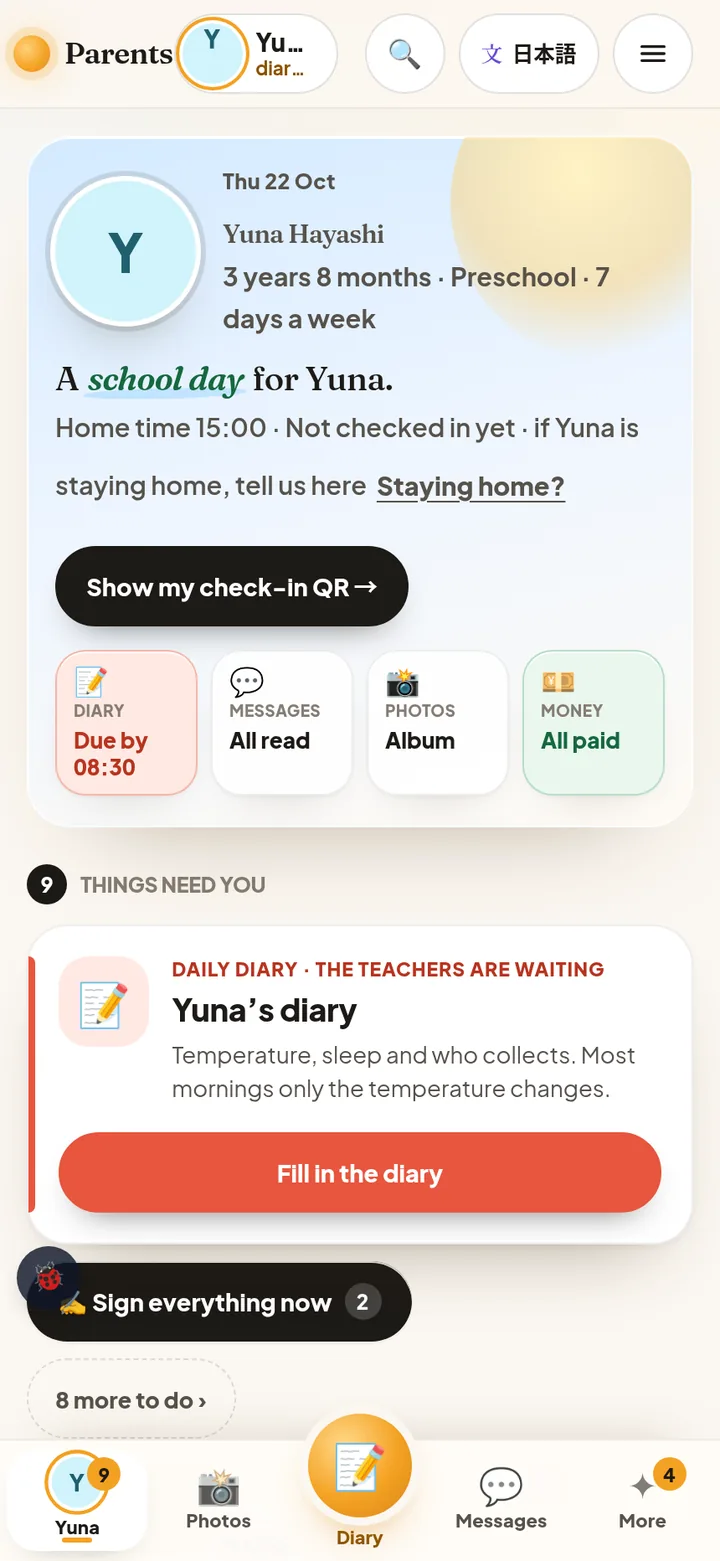
    Diary, check-in, head count by room, nap checks, meals, moments, the report. The 保育日誌 drafts itself from the day. Outings are watched on a map.

  5. 05

    Money

    Invoices come from the attendance plan. Bank and Wise statements are imported and matched. The late-fee rule is visible to the parent, and subsidy certificates print for the city.

  6. 06

    Events

    Open Day, festivals, parent evenings: RSVP, per-event questions, QR pages, printed invitations with a scan counter, and an iPad at the door.

  7. 07

    Safety & the law

    Incidents, hold-to-SOS on the bus, 感染症 return rules, 苦情解決 with deadlines, the customer-harassment desk and case record, per-person DBS checks, and the 131-item inspection checklist.

  8. 08

    Graduation

    The 要録 is written from the records kept all along. The family's documents are sealed into a vault, and the account is offboarded, not deleted.

2026's new duties

This year's laws are already built in.

Two new duties reached childcare in 2026. Neither is a checkbox on a list. Both live inside the screens staff already use.

In force 1 October 2026 · 労働施策総合推進法

Customer-harassment measures

Beside every message from a parent there is a 🛡. One tap files a case, the AI adds a first read, a manager checks in with the teacher. The policy, the consultation desk, the response menu, care for the person, and a yearly record that exports as CSV or an A4 table. The family never sees it, and nobody is penalized for reporting.

  • Policy, bilingual starter text, editable, printable
  • Consultation desk and training checklist
  • Case board with one-tap responses
Starts 25 December 2026 · 令和6年法律第69号

こども性暴力防止法 (the Japanese DBS)

Each staff member's and contractor's check status and due date sit in the legal-duties calendar. Facility category and certification route, which roles are in scope, training, reporting, information controls and contractor cooperation are inspection items with the article cited. An old check date is never shown as a completed legal check.

  • Per-person check dates and status
  • An item on the legal-duties calendar
  • On the inspection list, cited to e-Gov

The legal summaries are information, not advice. Confirm policy wording with your 社労士 or adviser.

The 14 apps

Every door in the school. One key.

Staff sign in once and see only the doors that fit their role. Lead teachers get the classroom tools, the bus crew gets the bus, the kitchen gets the kitchen, the office sees everything.

Families

👨‍👩‍👧

Parents 保護者

The family app. Diary, photos, messages, money, check-in QR, signed forms, extra days, Care Map, the lending library and a Q&A that answers from live school data.

📋

Forms フォーム

Surveys and admissions forms, signed by the parent, with submission tracking and analytics built in.

💬

Families' voice ご意見・苦情

A monthly one-tap pulse and 苦情解決 with response deadlines. Small concerns reach you before they grow.

Classroom

☀️

Classroom クラスルーム

The classroom day: register, head count by room, nap checks, meals, moments and reports drafted from the day. Works on one tablet shared by the whole school.

📓

Daybook 保育日誌

The 保育日誌 drafted from the day. 経過記録, 児童票 and 要録 live in the same place and draw on the same records.

🍱

Kitchen 給食室

Food labels, today's allergy board, stock, portions, purchase orders, and meal sign-off by a named preparer.

◉

Monitor モニター

Indoor safety signals for staff review. Sensors and nap checks on one screen.

Office

🪑

Boardroom ボードルーム

The school in one place: the Decide list, attendance sheets, payroll, accounting, assets, settings, the company and facility record, the legal-duties calendar, a demo school and inspection readiness.

💌

Contacts コンタクト

Admissions and families: screen-pop calls, tours, events with RSVP and QR, the family file, group send, invoices and the editor for your public website.

🏫

Campus キャンパス

The front door. Every door in one place, who is working today, where everyone is, the bell.

🚌

Bus バス

Routes and the live run: a walking avatar on the map, 点呼 roll call gates, stop notes and hold-to-SOS.

Team & library

🏕️

Team チーム

Projects, to-dos, the message board, meetings with minutes, the rota and 🛡 staff protection. The school's basecamp.

💭

Chat チャット

Team chat with rooms, private threads and groups. Share your location with 📍 and colleagues tap Follow. Paste an image, right-click to translate, call a colleague in-app.

📚

Library ライブラリー

The lending desk with its own sign-in. Lend and return, book value, teacher picks and school-year membership.

Underneath: 264 modules documented in 97 guides, with 87 difficult-day scenarios written out: the missing arrival, the late pickup, the delayed bus.

Built differently

Built for one school, not for a market.

01

Shaped by your staff

A teacher double-taps a screen to say what is wrong. It lands with the people who build PlayLearn, screen attached. Most fixes ship within the week. The software bends to the school, not the other way around.

02

Protects the staff too

Communication apps serve parents. PlayLearn also serves the teacher: the 🛡 beside a hard message, calm ratio notes instead of alarms, private check-ins only a manager sees, a watched outing, the bus SOS.

03

Bilingual by default

Every screen, notice and report, and every field of your public website, has a Japanese twin. A parent flips the whole app with one tap. It is not a premium add-on.

04

Private AI that judges

Voice typing for teachers, talk-to-fill for forms, right-click translate in chat, a first read on a difficult message, a parents' Q&A that answers from live school data. All on hardware we own in Japan. Nothing is kept and nothing goes to an outside AI company.

05

No passwords, pictures first

An email code once, then a passkey (Face ID or fingerprint). Teachers tap pictures, not forms. Every tap answers within one frame, and there are no spinners.

06

Your data stays yours

Plain files you can export. Backups that are restored and checked every day, not just taken. A demo school to play in, with a 30-day undo. Leaving is a download.

The small things

The small things nobody else bothered with.

This is where the quality of software shows. Every one of these is live.

  • Share your location from chat with 📍 and a colleague taps Follow. A walking avatar wears class-colored hats showing how many children are with you.
  • An outing has planned stops and stay times. Run over and a manager is nudged. Back at school, an "Everyone back?" card appears.
  • Tap the 🛡 beside a hard message from a parent and it becomes a case the family never sees.
  • The diary's temperature dial snaps to the school's 37.5 °C policy line.
  • A lost library book shows its real replacement price, pulled from the publisher database.
  • The parent sees the late-fee rule before it is ever applied.
  • Ratio alerts go to the office. The teacher gets a calm note, never an alarm.
  • Photo and face consent has three states, and blur is one of them.
  • Hold the bus SOS for two seconds and every office screen turns red.
  • A morning digest email lists everything waiting before the day starts.
  • Nine fair-hiring checks block a job post until every one passes.
  • Weather comes straight from the JMA feed, warnings included.
  • Your public website is edited inside the same system, with a live preview before publishing.
  • Every form is signed and timestamped by the parent on their own phone.
  • A shared classroom tablet knows who is working today, and signs their name to each record.
  • A teacher's voice note learns a child's name from the first correction.
  • An incoming call opens the family's record and the last conversation before you pick up.
  • An evacuation share in a disaster, and a whole-school "where is everyone" map.

Who it's for

Daycare and education, both.

  • Licensed-exempt & company-led daycareNotifications, inspection and statutory records from day one.
  • Licensed nurseries & 認定こども園The 保育日誌 → 児童票 → 要録 loop as it is.
  • KindergartensBus, events, parent evenings and lunch.
  • After-school programsPickup, extra days, late fees and check-in.
  • International & English schoolsDesigned for bilingual families from the start.
  • Multi-site groups & franchisesPer-site data scoping is on the roadmap. Ask us.

Pricing

One flat monthly fee per school.

All 14 apps. No per-child bands. No add-on menu. Replace twelve contracts with one and the number makes itself.

Founding schools · 2026–27

What's included

  • All 14 apps, unlimited staff and children
  • Setup and data migration from your current system
  • Your public website moved in, or built new
  • Staff training, on site or online
  • Requests from your staff go straight to the people who build it
  • Price fixed for two years
Ask for a quote →

For reference

The leading Japanese vendor's communication package runs ¥27,500 to ¥38,500 a month before add-ons (published prices, October 2026). That is one contract out of the twelve. PlayLearn is priced inside that range, with everything included.

Your price goes on a written quote by email. There are no hidden lines.

Contact

Thirty minutes to see your school's day.

A live walkthrough of the real screens, online. Slides only is fine too, in Japanese or English. We reply within one business day.

What you type here is used only to reply to you.